为什么要进行文本分块?
大型语言模型(LLM)和嵌入式模型都有其处理文本的长度限制。为了有效处理超出这些限制的长文本,我们需要进行文本分块。
如何进行文本分块
**块分割戒律:**我们的目标不仅仅是为了划分数据块。更重要的是,我们要以一种便于日后检索和提取价值的格式来整理我们的数据。
文本分块的根本目的不仅仅是简单地将数据分割成块。更重要的是,我们要以便于检索和提取价值的方式来组织这些数据块。以下是几种常见的分块逻辑:
句子分割(Sentence Splitting)
这种方法只是简单地将文本切分成N个字符的片段,不考虑内容或形式的连贯性。
text = "..." # 你的文本
from langchain.text_splitter import CharacterTextSplitter
text_splitter = CharacterTextSplitter(
    separator = "\n\n",
    chunk_size = 256,
    chunk_overlap  = 20
)
docs = text_splitter.create_documents([text])
递归字符文本分割(Recursive Character Text Splitting)
这种方法首先尝试用一个分隔符将文本切分成小块。如果初始尝试未能达到预期的块大小或结构,就递归地用不同的分隔符重新分割结果块,直到得到满意的结果。
text = "..." # 你的文本
from langchain.text_splitter import RecursiveCharacterTextSplitter
text_splitter = RecursiveCharacterTextSplitter(
    chunk_size = 256,
    chunk_overlap  = 20
)
docs = text_splitter.create_documents([text])
根据langchain 的默认分隔条件 ["\n\n", "\n", " ", ""] ,也就是会将text根据该分割条件的顺序(两个换行->一个换行->空格)将文本进行递归分割。
针对特定文档的分割方法(Document Specific Splitting)
例如针对Markdown或Python代码的分割策略,这些策略根据文档的结构来进行分割,如类定义或Markdown标题。
langchain 提供了一些常见文档的分割方法:
mardown的分割逻辑
[
                # First, try to split along Markdown headings (starting with level 2)
                "\n#{1,6} ",
                # Note the alternative syntax for headings (below) is not handled here
                # Heading level 2
                # ---------------
                # End of code block
                "```\n",
                # Horizontal lines
                "\n\\*\\*\\*+\n",
                "\n---+\n",
                "\n___+\n",
                # Note that this splitter doesn't handle horizontal lines defined
                # by *three or more* of ***, ---, or ___, but this is not handled
                "\n\n",
                "\n",
                " ",
                "",
            ]
python的分割逻辑:
[
                # First, try to split along class definitions
                "\nclass ",
                "\ndef ",
                "\n\tdef ",
                # Now split by the normal type of lines
                "\n\n",
                "\n",
                " ",
                "",
            ]
表格
重点提示: 后来在我们对数据块进行语义搜索时,直接从表格中匹配嵌入可能会比较困难。开发者常用的做法是,在提取了表格之后,对其进行关键信息提取。然后对这些关键信息的总结进行嵌入。如果这个总结的嵌入与你的搜索目标匹配,那么就可以把原始表格交给你的大语言模型处理。
语义分块
目前的文本分块方法大多基于结构或字符数量,忽视了文本的实际语义内容。有效的语义分块应当确保内容上相似的数据被归类在一起,这样不仅有助于数据的组织,还能提升后续处理的效率和准确性。
根据Greg的做法:寻找连续句子间的分割点, 即从第一句话开始,获取其嵌入,然后与第二句进行比较,以此类推。在寻找嵌入距离较大的“分割点”。如果距离超过了一定阈值,就认为这标志着新的语义段落的开始。

可以通过以下步骤来进行语义分块:
-
文档初始处理:首先将你的文档分割成句子,每个句子通常包含关于一个主题的单一观点。
-
句子嵌入:利用语言模型获取每个句子的嵌入表示。
-
句子比较与分块:从第一句话开始,逐句比较嵌入的相似度。当相邻句子之间的嵌入距离超过预设的阈值时,标记为新的语义段落的开始。
-
聚类相似句子:将语义上接近的句子聚集成块,同时保持句子的原始顺序。
伪代码示例
article = "你的完整文章"
chunks = [article[:1]]  # 默认第一部分为一个独立分块

# 文章逐句审查
for sentence in article[1:]:
    if is_similar(sentence, chunks[-1][-1]):
        chunks[-1].append(sentence)  # 如果新句子与当前块的最后一个句子相似,则加入当前块
    else:
        chunks.append([sentence])  # 如果不相似,则创建新的分块

# 持续这个过程直至文章末尾
# 在这种方法中,is_similar 函数需要定义为比较句子嵌入之间的距离,并判断它们是否足够接近。
特殊分块以及后处理
不见得一定要在召回后,返回原始的chunks。
Summary(摘要)
处理和存储大量文档的原始数据块往往不是最高效的方法。通过为每个文档创建摘要并进行嵌入,我们不仅可以减少处理的数据量,还能提高检索的速度和准确性。
https://python.langchain.com/docs/modules/data_connection/retrievers/multi_vector#summary
create a summary for each document, embed that along with (or instead of) the document.
import uuid

from langchain_core.documents import Document
from langchain_core.output_parsers import StrOutputParser
from langchain_core.prompts import ChatPromptTemplate
from langchain_openai import ChatOpenAI

chain = (
    {"doc": lambda x: x.page_content}
    | ChatPromptTemplate.from_template("Summarize the following document:\n\n{doc}")
    | ChatOpenAI(max_retries=0)
    | StrOutputParser()
)

summaries = chain.batch(docs, {"max_concurrency": 5})

# The vectorstore to use to index the child chunks
vectorstore = Chroma(collection_name="summaries", embedding_function=OpenAIEmbeddings())
# The storage layer for the parent documents
store = InMemoryByteStore()
id_key = "doc_id"
# The retriever (empty to start)
retriever = MultiVectorRetriever(
    vectorstore=vectorstore,
    byte_store=store,
    id_key=id_key,
)
doc_ids = [str(uuid.uuid4()) for _ in docs]

summary_docs = [
    Document(page_content=s, metadata={id_key: doc_ids[i]})
    for i, s in enumerate(summaries)
]

retriever.vectorstore.add_documents(summary_docs)
retriever.docstore.mset(list(zip(doc_ids, docs)))
Hypothetical questions
hypothetical_document_embeddings
HyDE (Hypothetical Document Embeddings)
HyDE(Hypothetical Document Embeddings,假设性文档嵌入),通过生成假设性的答案并对这些生成的文档进行嵌入,而非嵌入原始文本。这种方法特别适用于用户问题简短且与需要查找的原始文本在语义上相似度不高的情况。
当用户的问题与知识库中的原始文本在语义上相差较大时,传统的文档检索方法可能无法有效地匹配到相关内容。HyDE通过使用大型语言模型(LLMs)根据用户问题生成格式上类似于知识库中文本的假设性答案,从而提升匹配的准确率。
尽管HyDE可以提升检索的准确性,但这种方法也会一定程度上增加检索的耗时。为了平衡检索准确率和响应速度,可以考虑使用更强大的重排模型(reranking models)。这些模型能够在检索后的阶段进一步优化结果,通过精准地评估和排序生成的假设性答案,以提供最相关的回答。
Parent Document Retriever (PDR)
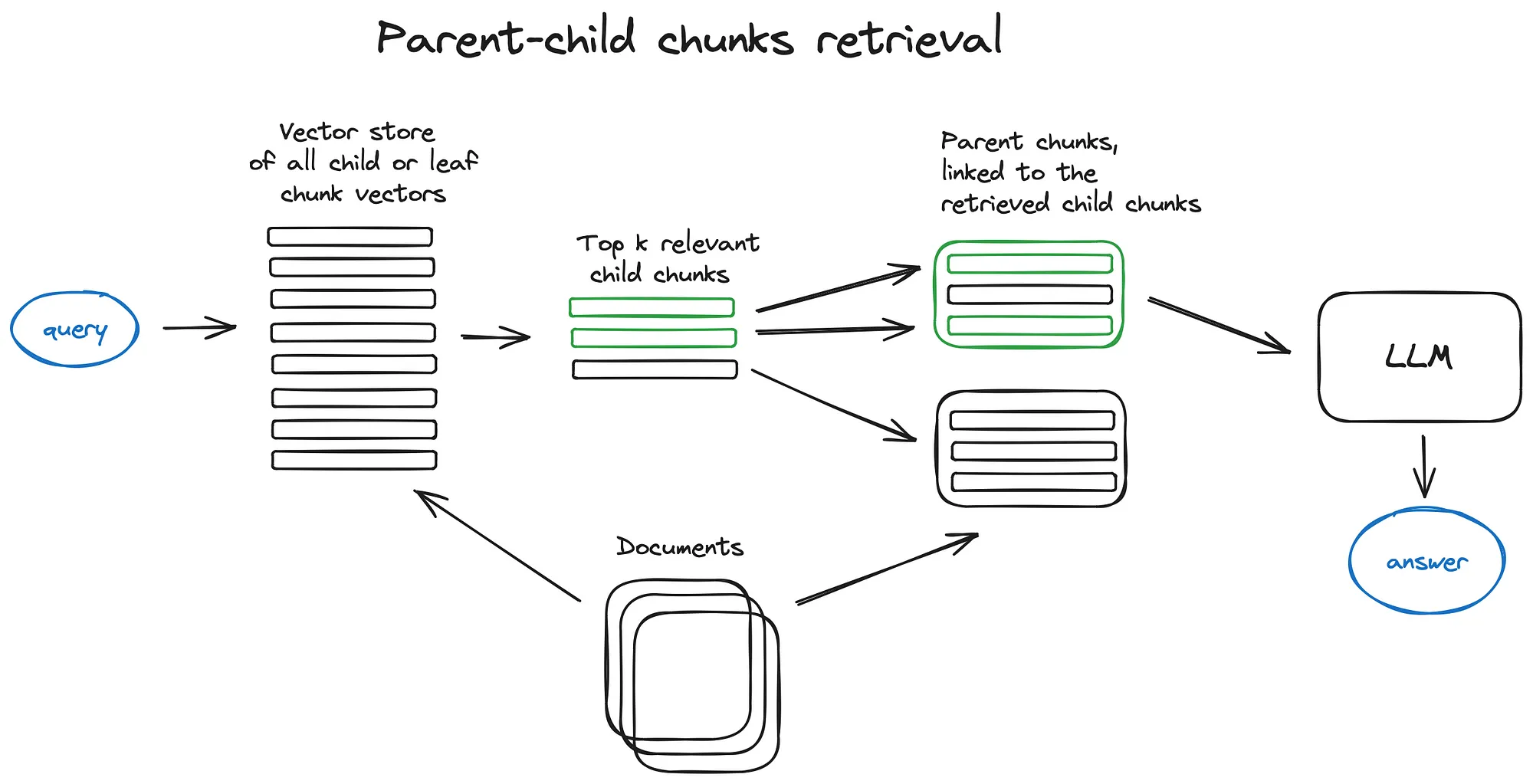
from Advanced RAG Techniques: an Illustrated Overview
A.K.A Multi-size-chunks(Parent Document Retriever/ parent-child chunks retriever/ Auto Merging Retriever)
核心思想是,尽管小片段的数据更容易在语义上与短小的用户查询匹配,但这些小片段往往缺乏提供全面回答所需的足够上下文。PDR的解决方案是在检索时优先获取这些小片段,然后识别并返回包含这些小片段的更大父文档,以此为基础进行问题的回答。
在使用embedding模型召回时,尽可能的将对应文本拆成句子级别,因为往往人的问题都是比较短的句子,这样在语义匹配上能够较好的匹配上;但是在使用LLM做回答时,由需要足够的上下文让模型能够有足够多的背景进行回答;因此在召回的时候倾向于使用small-chunks用于匹配,再通过某些聚合方式合并成一个具备相对完整上下文的较大chunks用作模型回答之背景;
在Langchain中提供了Parent Document Retriever这一方法。
During retrieval, it first fetches the small chunks but then looks up the parent ids for those chunks and returns those larger documents.
使用方法:
from langchain.retrievers import ParentDocumentRetriever
from langchain.storage import InMemoryStore
from langchain.text_splitter import RecursiveCharacterTextSplitter

# Retrieving larger chunks
# This text splitter is used to create the parent documents
parent_splitter = RecursiveCharacterTextSplitter(separators="\n",chunk_size=2000)
# This text splitter is used to create the child documents
# It should create documents smaller than the parent
child_splitter = RecursiveCharacterTextSplitter(separators="\n",chunk_size=400)

# define your docs = embeddings, and vectorstore
# docs = loader.load(...)
# emebeddings = OpenAIEmbeddings(...)
# vectorstore = Chroma(...)

# The storage layer for the parent documents
store = InMemoryStore()

retriever = ParentDocumentRetriever(
    vectorstore=vectorstore,
    docstore=store,
    child_splitter=child_splitter,
    parent_splitter=parent_splitter,
)
retriever.add_documents(docs)
而在llama_index中也提供了类似的方法。
# 创建较小的子块
from llama_index.schema import IndexNode
sub_chunk_sizes = [256, 512, 864]
sub_node_parsers = [
    SimpleNodeParser.from_defaults(chunk_size=c) for c in sub_chunk_sizes
]

all_nodes = []
for base_node in base_nodes:
    for n in sub_node_parsers:
        sub_nodes = n.get_nodes_from_documents([base_node])
        sub_inodes = [IndexNode.from_text_node(sn, base_node.node_id) for sn in sub_nodes]
        all_nodes.extend(sub_inodes)
    original_node = IndexNode.from_text_node(base_node, base_node.node_id)
    all_nodes.append(original_node)
all_nodes_dict = {n.node_id: n for n in all_nodes}

# 创建索引、检索器和查询引擎
vector_index_chunk = VectorStoreIndex(
    all_nodes, service_context=service_context
)

vector_retriever_chunk = vector_index_chunk.as_retriever(similarity_top_k=2)
retriever_chunk = RecursiveRetriever(
    "vector",
    retriever_dict={"vector": vector_retriever_chunk},
    node_dict=all_nodes_dict,
    verbose=True,
)

query_engine_chunk = RetrieverQueryEngine.from_args(
    retriever_chunk, service_context=service_context
)
response = query_engine_chunk.query(
    "Can you tell me about the key concepts for safety finetuning"
)
print(str(response))
Sentence Window Retrieval
为了更好地分析找到的语境,我们在检索到的最相关单句之前后各扩展 k 个句子,然后把这个扩展后的语境送给 LLM 进行推理
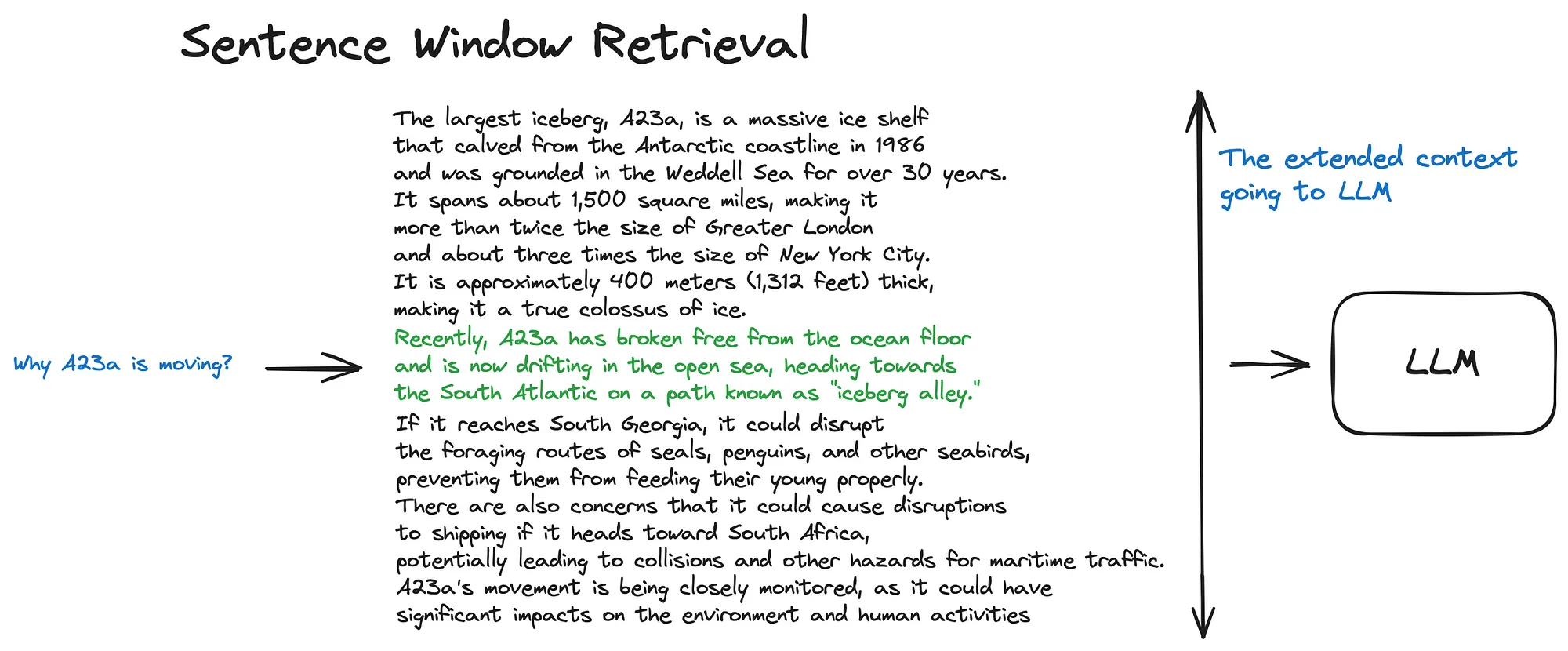
from Advanced RAG Techniques: an Illustrated Overview
分块可视化小工具
推荐一个可视化chunk-spliting 工具chunkviz
推荐阅读
Text splitting (chunking) for RAG applications
Chunking Strategies for LLM Applications