Updated on 2025-03-29: Add SmolDocling & VLM Summary
技术迭代速度之快令人惊叹,前作 RAG工具箱:文档解析与表格处理 在短短数月内已显现出代际差距,尽管前作也仅仅只是抛砖引玉式地讨论了pdf的解析方案,不过在新技术的面前,既有的复杂解析架构逐渐失去存在价值,也被端到端范式所取代。在笔者看来,基于多模态大模型的端到端文档解析方案,将成为最优解。
本文将探讨文档解析的终极形态——基于多模态大模型(VLM)的解析技术,包括Mistral-OCR、OlmOCR等前沿工具的实现与实践,并展望该领域的技术发展趋势,和对于RAG的影响。
过去的技术栈总结
在RAG系统中,文档解析质量直接决定系统上限。不同场景下的文档形态差异显著,若不能有效解决"garbage in, garbage out"的输入质量问题,后续处理环节将难以发挥应有价值。
传统文档解析技术长期受限于以下核心痛点:
-
结构化信息缺失:无法准确识别文档标题、副标题等层级结构
-
特殊内容处理薄弱:数学公式、专业符号解析准确率低下
-
复杂表格解析困境:跨页表格、合并单元格等场景支持不足
-
图像信息提取瓶颈:扫描文档、手写体识别效果欠佳
-
版式适应性问题:多栏布局、影印版本等文档格式兼容性差
从技术角度,过去文档解析的底层逻辑和框架:
-
纯文本解析:
PyPDF,PyMuPDF只能解析pdf中的文字,对于公式表格和复杂排版解析无能,对于扫描版低质量的pdf无能为力 -
OCR方案(PaddleOCR等): 首先使用目标检测模型对文档布局进行分析,识别出标题、表格等关键元素的位置,然后在这些位置上使用OCR技术提取文字;由于需要调用多个模型,整套系统非常复杂;
-
基于transformer 的解析方案(代表: Dount, Nougat):专门针对英文的学术文章做的训练, 能够将pdf文章整理成Markdown或Latex格式;但对于其他语言和其他类型的文档泛化效果很差;
随着模型能力提升,采用VLM做解析是非常自然的想法,尽管GPT-4o的发布使该技术获得广泛关注,但其高昂的API成本制约了实际应用。值得庆幸的是,开源社区的技术突破正在改变这一局面:不论是LLM基座模型多模态理解能力的增强,还是视觉编码器的提升,至少在当下,开源VLM已具备实用级文档解析能力,而无需针对下游任务的微调,同时成本上已经在可接受范围了。
Benchmark
为了判断一个模型是否适合Document Parsing,需要benchmark测试分数,作为模型挑选的标准。
现阶段,针对LLMs在OCR、文档信息提取场景下主要采用以下几个常见的bench
-
…and more
(关于benchmark的具体内容见附录)
这些bench都基本上包含了通用场景下的OCR能力, 多语言的文档解析能力的测试,能够一定程度上作为模型筛选的关注首选
当然,除了模型能力以外,还需要关注模型的参数量,因为与其成本和latency息息相关。
不过,对于每一个具体场景,还是需要构建自己的测试集用于判断模型是否能够胜任任务, 因为benchmark所包含的测试场景数据,分布语言等等和具体的场景不见得完全一样。
根据benchmark和实际测试结果,目前几个值得关注的开源VLM:
-
and more …
Qwen2.5-VL系列模型
这应该是开源的模型中,效果排前列的多模态模型(截止至今),同时还具备了多种参数量(3B,7B,72B)可选择。
在Technical Report 中一些和document-parse有关的内容:
在第一阶段视觉预训练中(仅训练ViT),针对Document Parsing,设计了一套标准化的HTML标签体系,包含:段落(
p>)、表格(<table>)、图表(<div class="chart">)、公式(<div class="formula">)、图像标注(<div class="image caption">)、OCR文本(<div class="image ocr">)、乐谱(<div class="music sheet">)、化学式(<div class="chemical formula">)等模块。每个模块均通过data-bbox属性标注其原始坐标位置,保留空间布局信息; 同时所有文档元素的布局信息(如位置、尺寸)通过原生分辨率下的绝对坐标直接编码到HTML标签中,使模型能同时学习内容语义和空间关系
针对OCR 数据, 利用高质量的合成图像和现实世界的自然场景图像, 整合了一个大规模的多语言OCR数据集,支持多种语言; 针对图表类型数据,使用python可视化库合成了100万个样本; 对于表格数据,利用表格识别模型处理了600万个真实样本用于训练
在post-training,设计了一个两阶段的数据过滤pipeline,用于数据清洗和低质量数据过滤,针对的对于不同领域提高数据质量;
在第三阶段,长上下文预训练: 序列长度扩展至 32768,专注于长视频、长代理任务和长文档,训练长上下文能力
可见, 该模型已针对Document Parsing 做了针对化的训练;至少单纯从视觉问答和 OCR benchmark的跑分结果看,72B 模型与 GPT-4o 和 Claude 3.5 Sonnet 相当
【但仅仅把这个模型用于document parsing有点浪费了】
同时Qwen官方也提供了详细的cookbook,包括了具体实现,这里就不展开了,不过记得将base-url改成
"https://dashscope-intl.aliyuncs.com/compatible-mode/v1" ->
"https://dashscope.aliyuncs.com/compatible-mode/v1"
试了下效果:
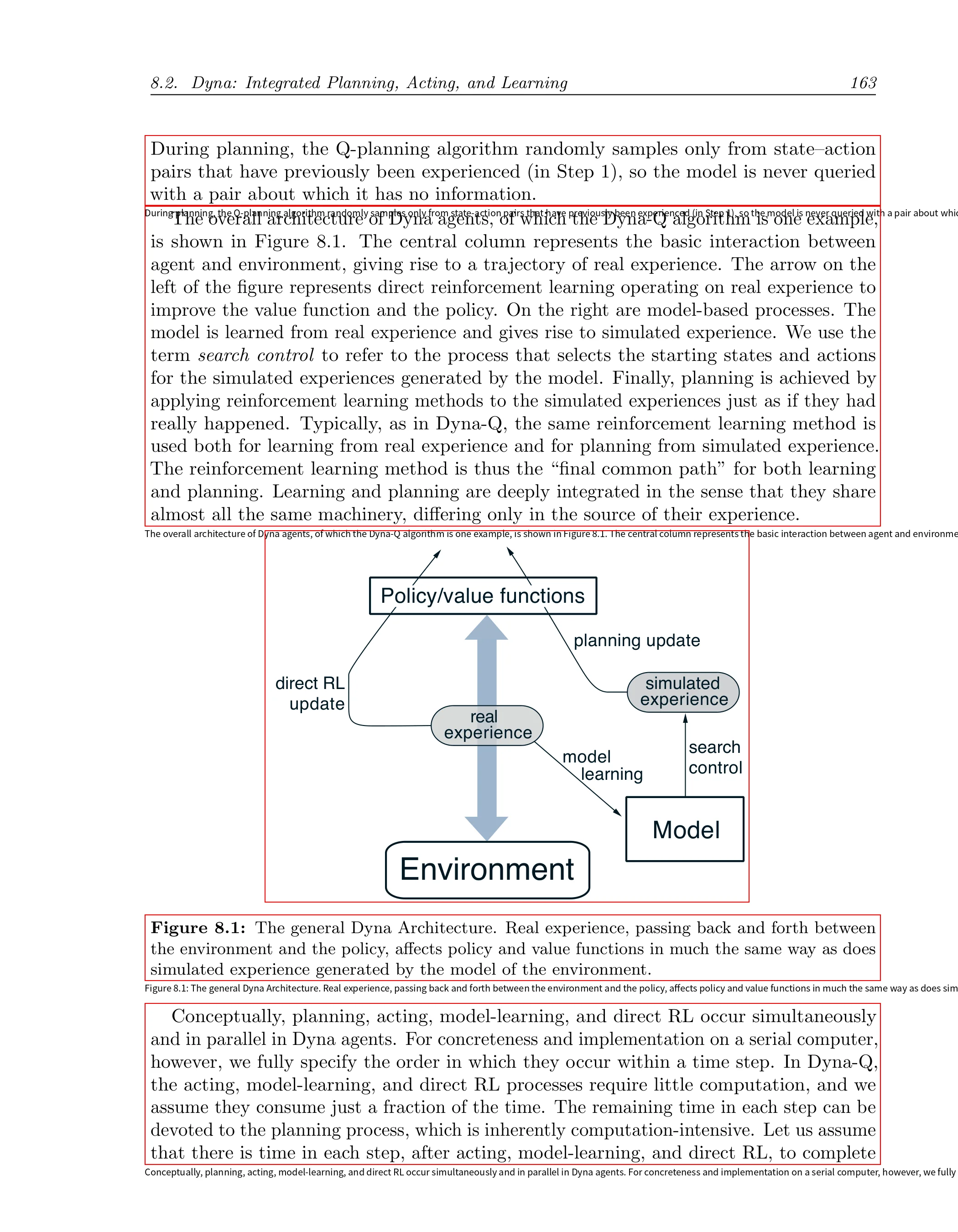
结果:
```html
<html><body>
<p>During planning, the Q-planning algorithm randomly samples only from state-action pairs that have previously been experienced (in Step 1), so the model is never queried with a pair about which it has no information.</p>
 <p>The overall architecture of Dyna agents, of which the Dyna-Q algorithm is one example, is shown in Figure 8.1. The central column represents the basic interaction between agent and environment, giving rise to a trajectory of real experience. The arrow on the left of the figure represents direct reinforcement learning operating on real experience to improve the value function and the policy. On the right are model-based processes. The model is learned from real experience and gives rise to simulated experience. We use the term search control to refer to the process that selects the starting states and actions for the simulated experiences generated by the model. Finally, planning is achieved by applying reinforcement learning methods to the simulated experiences just as if they had really happened. Typically, as in Dyna-Q, the same reinforcement learning method is used both for learning from real experience and for planning from simulated experience. The reinforcement learning method is thus the “final common path” for both learning and planning. Learning and planning are deeply integrated in the sense that they share almost all the same machinery, differing only in the source of their experience.</p>
 <div class="image"><img/></div>
 <p>Figure 8.1: The general Dyna Architecture. Real experience, passing back and forth between the environment and the policy, affects policy and value functions in much the same way as does simulated experience generated by the model of the environment.</p>
 <p>Conceptually, planning, acting, model-learning, and direct RL occur simultaneously and in parallel in Dyna agents. For concreteness and implementation on a serial computer, however, we fully specify the order in which they occur within a time step. In Dyna-Q, the acting, model-learning, and direct RL processes require little computation, and we assume they consume just a fraction of the time. The remaining time in each step can be devoted to the planning process, which is inherently computation-intensive. Let us assume that there is time in each step, after acting, model-learning, and direct RL, to complete</p>
</body></html>
```
【实测遇到的问题】:
-
图表类image的bbox经常不包含图表label
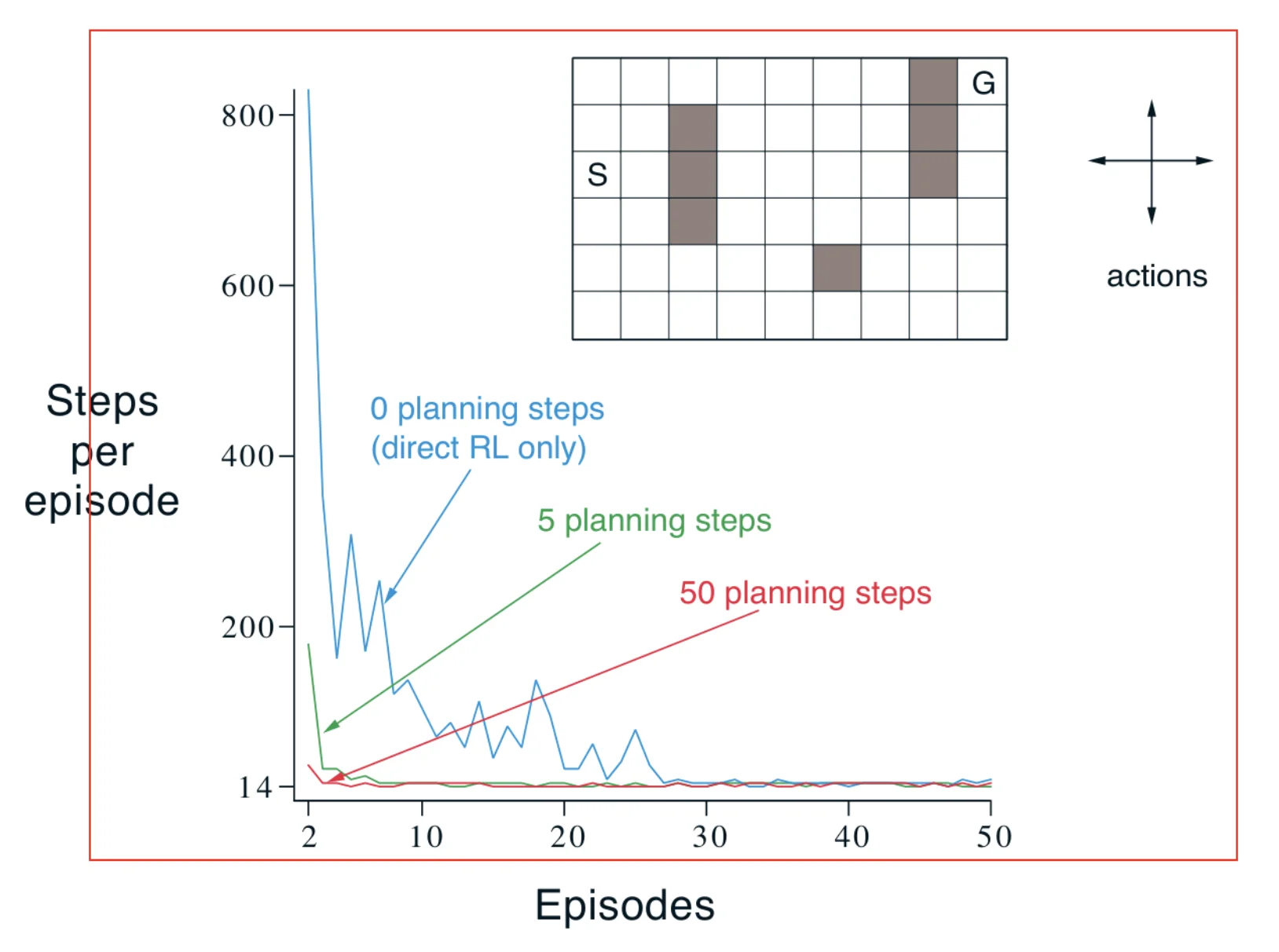
瑕不掩瑜,可以说效果是非常惊艳了。
Mistral OCR
https://mistral.ai/en/news/mistral-ocr
https://docs.mistral.ai/capabilities/document/
Mistral AI 推出的OCR API,专注于复杂文档的多模态理解,擅长处理科学论文等含图表混合内容的文档
输入格式:支持 PNG、JPEG 图像及 PDF
输出格式:生成有序的 Markdown 或 JSON 结构化数据
基础版价格为 1000 页/美元
体验感受
-
快速解析完一篇论文的pdf(5~10 sec)
-
结构化json输出
-
能够截取pdf中的图像,并提供对应的位置信息和Base64编码
-
基本上是目前首选了
猜测,大概率是使用的是mistral自家的mistralai/Pixtral-12B-2409 模型
how to use
pip install mistralai
from mistralai import Mistral

api_key = "API_KEY"
client = Mistral(api_key=api_key)
ocr_model = "mistral-ocr-latest"
system = """You are an AI Assistant with document understanding via URLs. You will be provided with URLs, and you must answer any questions related to those documents.

# OPEN URLS INSTRUCTIONS
You can open URLs by using the `open_urls` tool. It will open webpages and apply OCR to them, retrieving the contents. Use those contents to answer the user.
Only URLs pointing to PDFs and images are supported; you may encounter an error if they are not; provide that information to the user if required."""


def _perform_ocr(url: str) -> str:
    try:   # Apply OCR to the PDF URL
        response = client.ocr.process(
            model=ocr_model,
            document={
                "type": "document_url",
                "document_url": url
                }
            )
    except Exception:
        try:  # IF PDF OCR fails, try Image OCR
            response = client.ocr.process(
                model=ocr_model,
                document={
                    "type": "image_url",
                    "image_url": url
                    }
                )
        except Exception as e:
            return e  # Return the error to the model if it fails, otherwise return the contents
    return "\n\n".join([f"### Page {i+1}\n{response.pages[i].markdown}" for i in range(len(response.pages))])


pdf_response = _perform_ocr("https://arxiv.org/pdf/2201.04234")
输出格式:
{
    "pages": [
        {
            "index": 1,
            "markdown": "markdown-content",
            "images": [
                {
                    "id": "img-0.jpeg",
                    "top_left_x": 292,
                    "top_left_y": 217,
                    "bottom_right_x": 1405,
                    "bottom_right_y": 649,
                    "image_base64": "..."
                }
            ],
            "dimensions": {
                "dpi": 200,
                "height": 2200,
                "width": 1700
            }
        },
      ...
}
甚至包括了图像的坐标信息
通过以下代码,能够或者最终完整的markdown
from mistralai.models import OCRResponse
from IPython.display import Markdown, display
def replace_images_in_markdown(markdown_str: str, images_dict: dict) -> str:
for img_name, base64_str in images_dict.items():
markdown_str = markdown_str.replace(f"", f"")
return markdown_str
def get_combined_markdown(ocr_response: OCRResponse) -> str:
markdowns: list[str] = []
for page in pdf_response.pages:
image_data = {}
for img in page.images:
image_data[img.id] = img.image_base64
markdowns.append(replace_images_in_markdown(page.markdown, image_data))
return "\n\n".join(markdowns)
display(Markdown(get_combined_markdown(pdf_response)))
OlmOCR
github:https://github.com/allenai/olmocr
demo:https://olmocr.allenai.org/
其核心VLM—allenai/olmOCR-7B-0225-preview, 是采用Qwen2-VL-7B 在250,000 页的多样化 PDF 数据集上进行微调而得的
不仅是开源了模型, 同时还开源了一整套的解析工作管道,及其微调数据集、训练和推理代码。
环境:
apt-get install poppler-utils ttf-mscorefonts-installer msttcorefonts fonts-crosextra-caladea fonts-crosextra-carlito gsfonts lcdf-typetools
git clone https://github.com/allenai/olmocr.git
cd olmocr
pip install -e .
pip install sgl-kernel==0.0.3.post1 --force-reinstall --no-deps
pip install "sglang[all]>=0.4.3.post2" --find-links https://flashinfer.ai/whl/cu124/torch2.4/flashinfer/
local usage
python -m olmocr.pipeline /content/localworkspace --pdfs /content/pdf/*.pdf
解析成功后,会在本地生成一个jsonl文件,包括每一页的解析结果
(样例)
{
  "id":"id",
  "text": "markdown-content",
  "source": "olmocr",
  "added": "time",
  "created": "time",
  "metadata":
    {"Source-File": "file-path",
      "olmocr-version": "0.1.58",
      "pdf-total-pages": 17,
      "total-input-tokens": 67608,
      "total-output-tokens": 14821,
      "total-fallback-pages": 0},
  "attributes": {"pdf_page_numbers": [[0, 3519, 1], [3519, 8803, 2], [8803, 12566, 3], [12566, 15747, 4], [15747, 19147, 5], [19147, 22975, 6], [22975, 25485, 7], [25485, 31108, 8], [31108, 35902, 9], [35902, 38215, 10], [38215, 39584, 11], [39584, 42844, 12], [42844, 45389, 13], [45389, 48985, 14], [48985, 49297, 15], [49297, 49579, 16], [49579, 51463, 17]]
}
实际测试共72页pdf(arxiv论文),使用Nvidia-L4 GPU
input_tokens 151.32 tokens/sec
output_tokens 47.16 tokens/sec
总耗时40min。
SmolDocling
由 IBM Research 和 Hugging Face 开发的VLM,专为文档转换设计,可以处理整个页面,生成一种称为 DocTags 的自定义标记格式,这种格式能详细记录文档元素的文本内容、布局结构和位置信息。模型参数仅为 256 M。
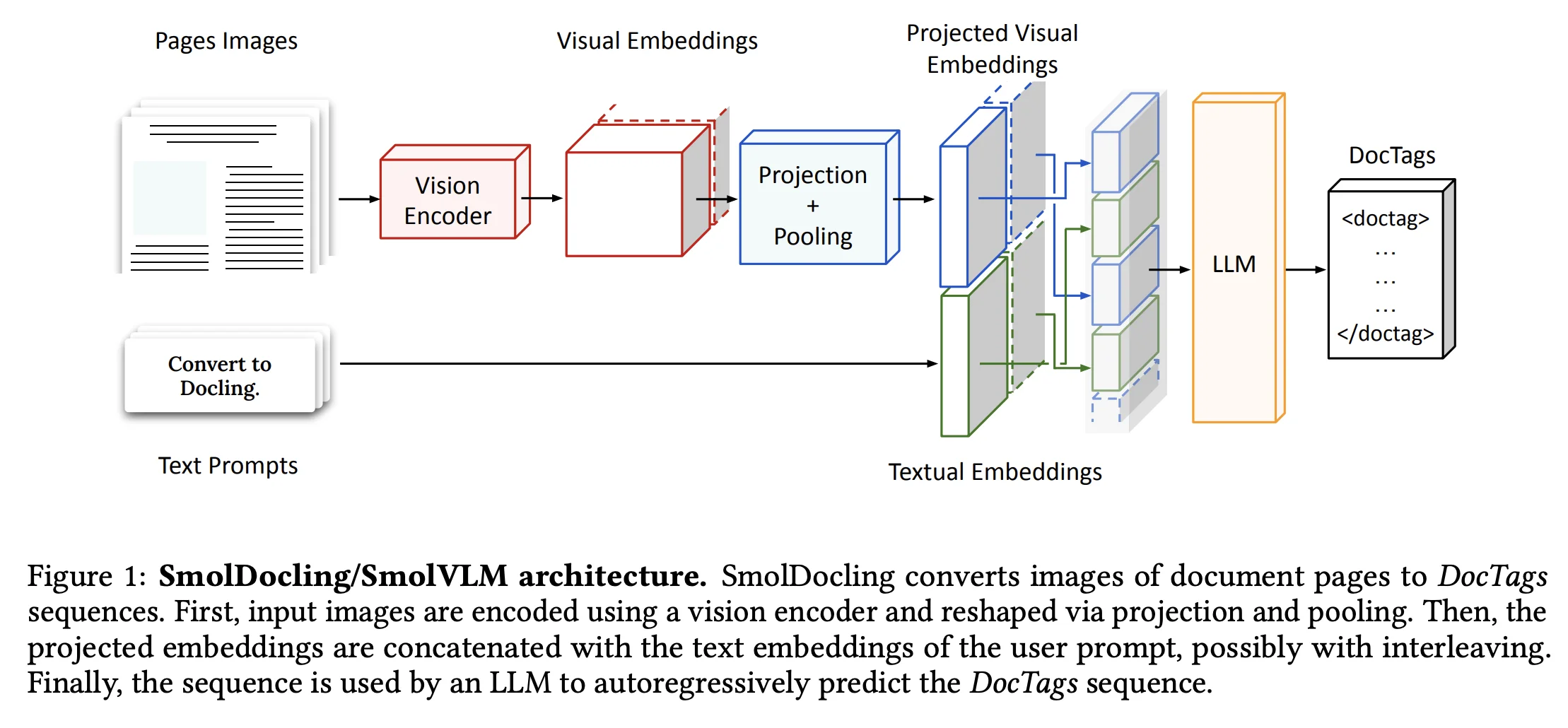
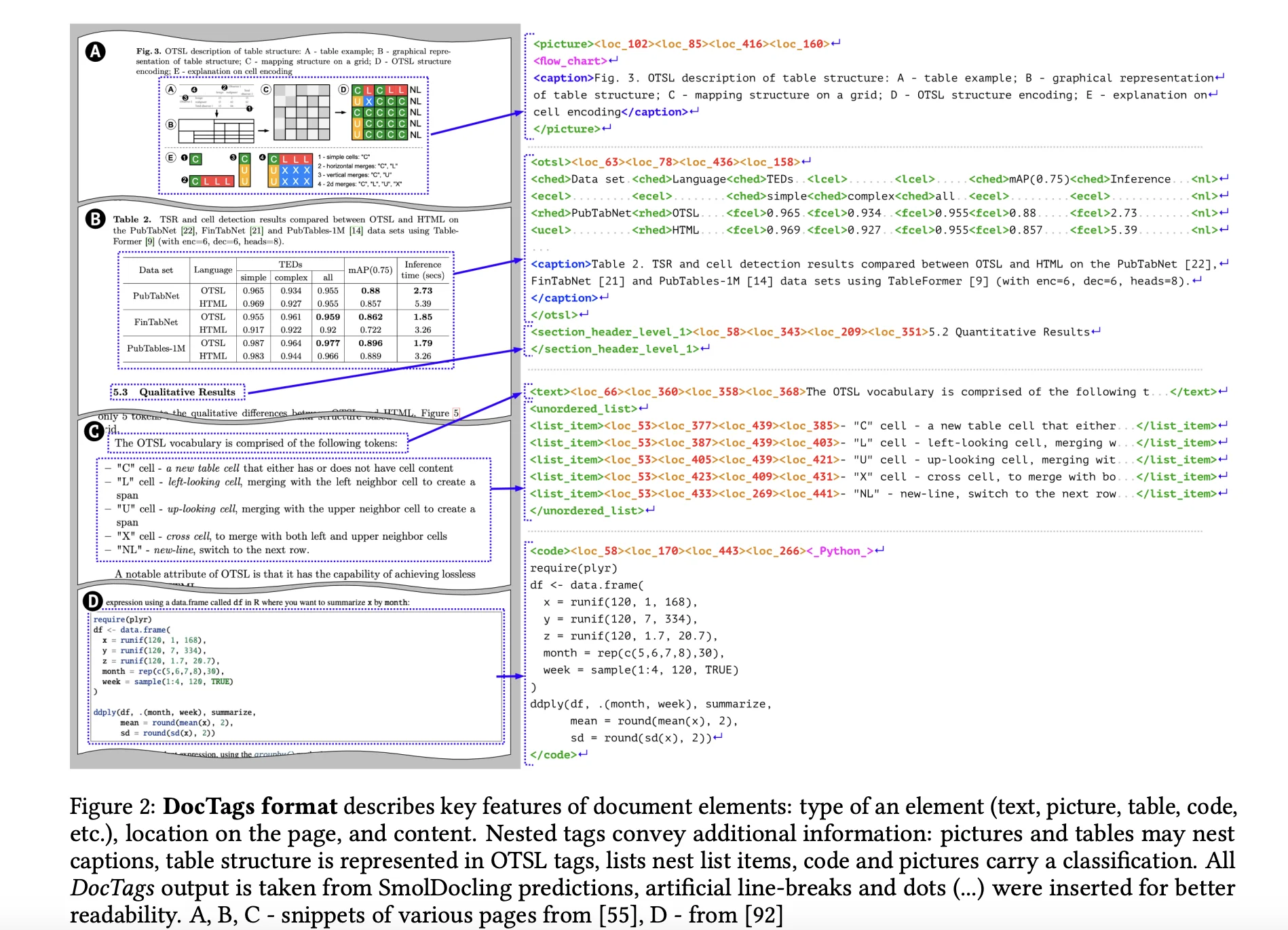
模型通过端到端方式处理整个文档页面,生成 DocTags 序列。DocTags 是一种受 OTSL 启发的标记格式,采用 XML 风格标签(如 <text>、<table>、<code>、<formula>)与位置标签(如 <loc_x1><loc_y1><loc_x2><loc_y2>)结合,基于 0-500 网格映射页面尺寸,确保捕获元素的空间位置和上下文关联。支持多种文档元素的重现,包括标题、图表、表单、代码、公式、表格、脚注、列表、页眉/页脚和章节标题,并提供 OCR(光学字符识别)、阅读顺序和层次链接(如标题与图表/表格的对应)。
To the Future
from Document Parsing to Document Intelligence
当前基于VLM的方案依旧存在一些问题
在不同领域和场景下的文档处理中,需要调整解析的prompt或增加相应的LLM优化内容。这些prompt或工作流通常是定制化的,缺乏良好的泛化能力。如果能够开发出一个智能代理应用,针对不同场景的文档进行解析和优化调整,那将是非常理想的。然而,目前市场上尚未出现这样的解决方案。
文档解析是RAG任务的第一步,与之密切相关的下一步是文本分块(chunking),这与解析过程息息相关,甚至可以结合在一起或者合并在一起。在VLM解析中,我们已经能够获得文档的某种结构化信息(或语义层级关系)。这种信息对于智能代理进行文本分块具有参考价值,而不仅仅是基于长度的简单分割。
解析成markdown/json的执念或许是过时的想法了
为何不直接做多模态的RAG呢?
与其设计复杂的系统:从文档解析成markdown/json-分块-建立索引-检索,不如直接将vision-encoder 隐藏层输出用于索引的构建,这也是ColPali这篇工作的想法。
甚至是类似CAG(Cache-Augmented Generation)中的想法, 直接利用VLM的KV-Cache 也是完全有可能的。
附录1: VLM Benchmark
OCRBench 和 OCRBench v2
OCRBench 和其升级版 OCRBench v2 是用于评估大型多模态模型(LMMs)在光学字符识别(OCR)任务中的性能的基准。OCRBench 包括文本识别、场景文本相关的视觉问答(VQA)、文档导向的VQA、关键信息提取和手写数学表达式识别等任务。OCRBench v2 扩展了任务范围,覆盖更多场景(如街道场景、收据、公式、图表等),包含10,000个经过人工验证的问题-答案对。
OmniDocBench v2
OmniDocBench v2 是一个专门为PDF文档解析设计的基准
它包括981页PDF,涵盖9种文档类型(如学术论文、教科书、幻灯片等)、4种布局类型和3种语言类型
丰富的注释信息,包括块级(如文本段落、标题、表格)和跨度级(如文本行、公式)元素
CC-OCR
包括四个轨道:多场景文本阅读、多语言文本阅读、文档解析和关键信息提取
覆盖10种语言(如英语50.3%、中文28.2%)
附录2: 比较热门的几个开源文档解析项目
marker
https://github.com/vikparuchuri/marker

使用 Surya 模型检测文本块的布局和阅读顺序,从 PDF 中提取文本,尤其是图像或非文本元素
可选 LLM 处理,(支持 Gemini ,Claude,ollama)来优化输出,处理复杂元素
如何使用:
pip install marker-pdf[full]
# 命令行
marker_single /path/to/file.pdf
from marker.converters.pdf import PdfConverter
from marker.models import create_model_dict
from marker.output import text_from_rendered

converter = PdfConverter(
    artifact_dict=create_model_dict(),
)
rendered = converter("FILEPATH")
text, _, images = text_from_rendered(rendered)
核心部分PdfConverter
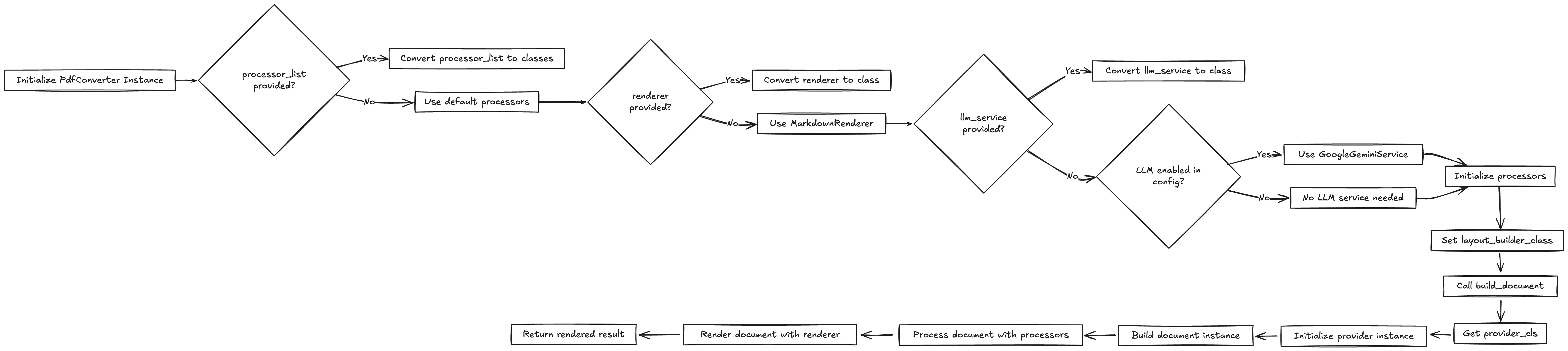
Marker 和 Surya OCR 模型的权重受 cc-by-nc-sa-4.0 许可限制,但对于年收入低于 500 万美元且终身 VC/天使融资低于 500 万美元的组织,该限制可豁免
MinerU
https://github.com/opendatalab/MinerU/tree/master
文档:https://mineru.readthedocs.io/zh-cn/latest/
MinerU 主要通过 PDF-Extract-Kit 使用以下模型:
-
布局检测:DocLayout-YOLO_ft, YOLO-v10_ft, LayoutLMv3_ft
-
公式检测:YOLOv8_ft
-
公式识别:UniMERNet
-
OCR:PaddleOCR
-
表格识别:PaddleOCR+TableMaster, StructEqTable, StructTable-InternVL2-1B

markitdown
https://github.com/microsoft/markitdown
如何使用:
pip install markitdown openai
普通的pdf解析
from markitdown import MarkItDown

md = MarkItDown()
result = md.convert("you-pdf-file.pdf")
print(result.text_content)
其本质是采用pdfminer,做PDF 文本提取
支持llm做image caption:
from markitdown import MarkItDown
from openai import OpenAI

client = OpenAI()
md = MarkItDown(llm_client=client, llm_model="gpt-4o")
result = md.convert("example.jpg")
print(result.text_content)
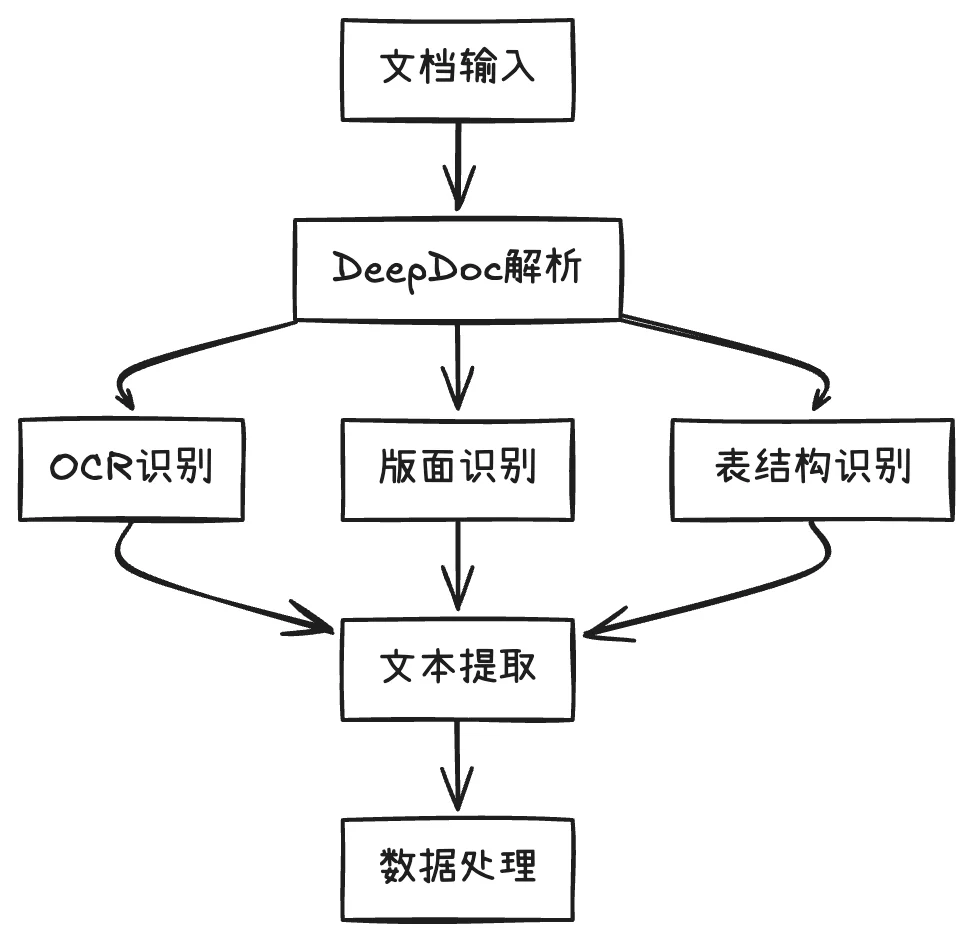
(RAGFlow)DeepDoc
支持多种文档格式如PDF、DOCX、EXCEL、PPT
两个组成部分:视觉处理和解析器
通过OCR技术识别文本,并进行版面分析以识别不同类型的区域,如表格、标题、段落
附录3: VLM 汇总表格
| 模型名称 | 参数量 | OCRBench | OCRBenchV2 | ChartQA |
|---|---|---|---|---|
| Phi-4-Multimodal | 5.6B | 84.4 | - | 81.4 |
| Qwen2.5-VL-3B | 3B | 82.2 | 54.3 | 80.0 |
| Qwen2.5-VL-7B | 7B | 87.7 | 56.3 | 85.0 |
| Qwen2.5-VL-72B | 72B | - | 61.5 | - |
| Gemma3-4B | 4B | - | - | 79.8 |
| Gemma3-12B | 12B | - | - | 83.5 |
| Gemma3-27B | 27B | - | - | 83.4 |
| SmolDocling | 256M | - | - | - |
| GPT-4o-mini | - | 77.1 | - | 54.5 |
参考和数据来源: